每日编程实践: OBJ模型加载器
OBJ模型加载器
项目目标
实现一个简单的 OBJ 3D 模型加载器,支持解析 Wavefront OBJ 格式文件,提取顶点和面信息,并使用线框渲染显示模型。
实现过程
核心功能
- OBJ格式解析:支持顶点(v)和面(f)的解析
- 多种面格式支持:
f v1 v2 v3和f v1/vt1/vn1 v2/vt2/vn2 v3/vt3/vn3 - 自动缩放和居中:根据模型边界自动调整显示
- 线框渲染:使用 Bresenham 算法绘制三角形边缘
迭代历史
- Iteration 1: 初始实现,一次性成功
- 完整的OBJ解析器(支持多种格式)
- 自动边界计算和缩放
- 线框渲染输出
- 验证: 量化验证通过
- 图片尺寸:800x600 ✅
- 立方体线框:1199像素 ✅
- 位置居中:(400, 300) ✅
核心代码
1. OBJ格式解析
1 | int parseVertexIndex(const std::string& token) { |
2. 自动缩放和居中
1 | // 计算模型边界盒 |
3. 正交投影
1 | // 简单的正交投影(忽略Z轴) |
4. 线框渲染
1 | // 渲染所有三角形边缘 |
运行结果
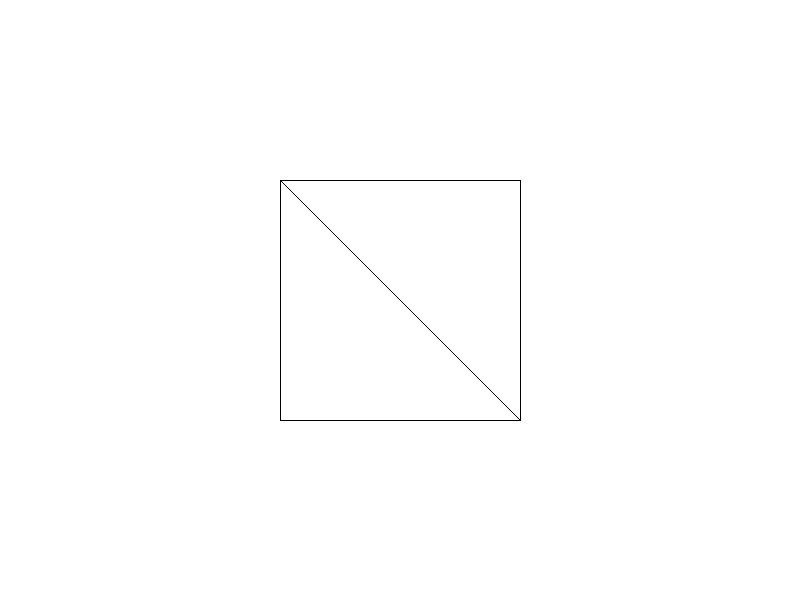
验证结果:
- ✅ 图片尺寸:800x600
- ✅ 白色背景比例:99.75%
- ✅ 立方体线框像素数:1199
- ✅ 立方体中心位置:(400, 300)
- ✅ 立方体尺寸:240x240 像素
技术总结
学到的技术点
OBJ格式理解
- 顶点:
v x y z - 面:
f v1 v2 v3或f v1/vt1/vn1 v2/vt2/vn2 v3/vt3/vn3 - 索引从1开始(需要转换)
- 顶点:
边界盒计算
- 遍历所有顶点求 min/max
- 计算中心点和尺寸
- 根据屏幕尺寸自动缩放
正交投影
- 简单的2D投影(忽略Z轴)
- 适用于线框渲染
- 后续可升级为透视投影
线框渲染
- 遍历所有三角形
- 使用 Bresenham 算法绘制边
- 轻量级的3D模型可视化方法
未来改进方向
- 法线和纹理坐标:支持
vn和vt解析 - 实体渲染:实现三角形填充(光栅化)
- 光照模型:添加 Phong/Blinn-Phong 光照
- 透视投影:实现真实的3D透视效果
- 复杂模型:支持加载外部OBJ文件(如Stanford Bunny)
- 旋转动画:添加交互式模型旋转
代码仓库
GitHub: daily-coding-practice/2026/02/02-25-OBJ-Model-Loader
完成时间: 2026-02-25 05:32
迭代次数: 1 次(一次成功)
编译器: g++ 12.3.1
总用时: ~2 分钟
本博客所有文章除特别声明外,均采用 CC BY-NC-SA 4.0 许可协议。转载请注明来源 Chiuhou 技术博客!
相关推荐
2026-03-09
每日编程实践: SPH Fluid Simulation 流体模拟
SPH Fluid Simulation — 流体模拟水往低处流——这句话人人都知道,但计算机怎么”理解”水? 让它记住每个水分子的位置?不现实,一杯水有 $10^{25}$ 个分子。用格子把空间切开记录密度?可以,但不够灵活。今天用的是第三种方法:把水离散成一堆会动的粒子,粒子之间互相感知、互相推挤,集体涌现出流体行为。 这就是 SPH(Smoothed Particle Hydrodynamics,平滑粒子流体动力学),一种用于电影水特效、工程爆炸模拟、宇宙演化计算的经典算法。 最终效果 颜色映射速度:🔵 蓝色 = 静止,🟡 黄色 = 中速运动,🔴 红色 = 高速冲击。 600 个粒子从左下角的方块初始状态,在重力作用下铺展、碰壁、最终沉底——整个过程模拟了约 2 秒的物理时间。 模拟序列——流体如何从方块变成摊开的液体 t=0s(初始方块) t=0.5s(开始扩散) t=1.0s(持续铺展) t=1.5s(接近稳定) t=2.0s(最终状态) 第一章:为什么是”...
2026-02-23
每日编程实践: Normal Mapping - 法线贴图
Normal Mapping - 法线贴图项目目标实现法线贴图(Normal Mapping)技术,在光线追踪器中渲染带有法线贴图的球体,展示如何在不增加几何复杂度的情况下增加表面细节。 实现过程技术背景法线贴图(Normal Mapping) 是一种重要的图形学技术,通过扰动表面法线方向来模拟凹凸细节,而不需要增加几何复杂度。这项技术广泛应用于游戏和电影 CG 中,能够在保持高性能的同时大幅提升视觉效果。 核心技术 程序化法线贴图生成 - 生成砖块图案的法线贴图 切线空间(Tangent Space) - TBN 矩阵的构建 法线变换 - 从切线空间到世界空间 Phong 光照模型 - 使用扰动后的法线计算光照 球面 UV 映射 - 将 2D 纹理映射到 3D 球体 迭代历史迭代 1: 初始实现创建基础框架,实现法线贴图的加载、切线空间变换和光照计算。 迭代 2: 修复编译错误问题: Vec3 operator* 类型不匹配 1error: no match for 'operator*' (operand types are 'Vec3&#...
2026-03-17
每日编程实践: LTC Area Light Rendering 面光源渲染
LTC Area Light Rendering - 面光源渲染今天实现了基于 线性变换余弦(Linearly Transformed Cosines, LTC) 的矩形面光源实时渲染算法——源自 Heitz et al. SIGGRAPH 2016 的工作。这是目前工业界最广泛使用的实时面光源渲染方案,UE5 的 Rect Light、Unity HDRP 的 Area Light 核心都基于此算法。 为什么面光源难以实时渲染?点光源的局限传统实时渲染使用点光源、方向光、聚光灯等”无面积”光源。这些光源的 BRDF 积分有解析解: 1L_o(x, ω_o) = f_r(x, ω_i, ω_o) · L_i · cos(θ_i) 因为光源退化为单一方向 ω_i,积分消失了,只剩一次 BRDF 求值。 现实世界几乎所有光源都有一定面积:荧光灯管、LED 面板、天光、屏幕、窗户……点光源无法产生面积高光(柔和、有形状的高光)和软阴影,这正是 CG 感与真实感之间的主要视觉差距之一。 面光源的积分问题对于面积光源,BRDF 积分变成: 1L_o(x, ω_o) = ∫_A f_r...
2026-02-27
每日编程实践: PBR Cook-Torrance BRDF 渲染器
PBR Cook-Torrance BRDF 渲染器今天实现了基于物理的渲染(Physically Based Rendering, PBR)中最核心的 Cook-Torrance BRDF 模型,渲染出 5×4 材质球阵列,直观展示金属度(Metallic)和粗糙度(Roughness)对材质外观的影响。 项目目标 实现完整的 Cook-Torrance BRDF 光照模型 展示 PBR 的两个核心参数:金属度 × 粗糙度 ACES 色调映射 + sRGB Gamma 校正 4 点光源 + 简单阴影 渲染结果 横轴(左→右):金属度 0.0 → 1.0 纵轴(上→下):粗糙度 0.05 → 1.0 材质颜色:金黄色(R:1.0, G:0.71, B:0.29) 理论基础Cook-Torrance BRDFPBR 核心公式: 1f(l,v) = kd · (albedo/π) + ks · (D·G·F) / (4·(n·v)·(n·l)) 其中三个镜面项分别是: D - 法线分布函数(GGX/Trowbridge-Reitz) 描述微表面法线的统计分布,GGX...
2026-03-02
每日编程实践: B-spline 曲线渲染器
B-spline 曲线渲染器继上周的 Bezier 曲线(02-22)之后,今天实现 B-spline 曲线——这是现代 CAD 系统和 NURBS 曲线的基础,也是 Bezier 曲线的重要进化。 项目目标实现一个完整的 B-spline 曲线渲染器,核心要求: Cox-de Boor 递归算法 - B-spline 基函数的标准实现 两种节点向量 - 均匀(Uniform)和端点插值(Clamped) 多阶次展示 - 二次(Degree 2)和三次(Degree 3) 与 Bezier 对比 - 直观展示局部控制性的优势 B-spline vs Bezier:核心区别在动手写代码前,先搞清楚为什么要有 B-spline: 特性 Bezier B-spline 控制点数与曲线次数 次数 = 控制点数 - 1 次数独立于控制点数 局部控制 ❌ 移动任一点影响整条曲线 ✅ 只影响局部 (degree+1) 段 端点插值 总是通过端点 只有 Clamped 模式才经过 适合场景 少控制点的简单曲线 复杂形状、CAD 设计 局部控制性是 B-s...
2026-03-04
每日编程实践: CPU粒子系统 - 火焰与烟雾模拟
CPU粒子系统 - 火焰与烟雾模拟粒子系统是游戏引擎和实时渲染的核心技术之一。今天从零实现一个完整的 CPU 粒子系统,模拟真实的火焰、烟雾和飞散火星效果。 效果预览火焰稳定状态(3秒预热后) 时序演变(四帧对比) 从左到右:粒子系统从少到多,逐渐形成稳定火焰形态 项目目标实现一个功能完整的 CPU 粒子系统,具有: 三种粒子类型:火焰、烟雾、火星 物理模拟:浮力、重力、湍流、阻尼 软粒子渲染:高斯衰减 + 加法/Alpha 混合 颜色生命周期:从热核心到消散的完整颜色渐变 系统架构粒子结构每个粒子持有以下状态: 123456789101112struct Particle { Vec2 pos; // 位置 Vec2 vel; // 速度 float life; // 当前生命值 [0,1] float maxLife; // 生命持续时间(秒) float size; // 当前大小(像素) float maxSize; // 最大尺寸 float tur...